精進 · shōjin — diligence
Log lifts.See real progress.
A fast, private strength tracker that gets out of your way. Shojin Coach writes your program from your lifts and adapts it to every session you log.
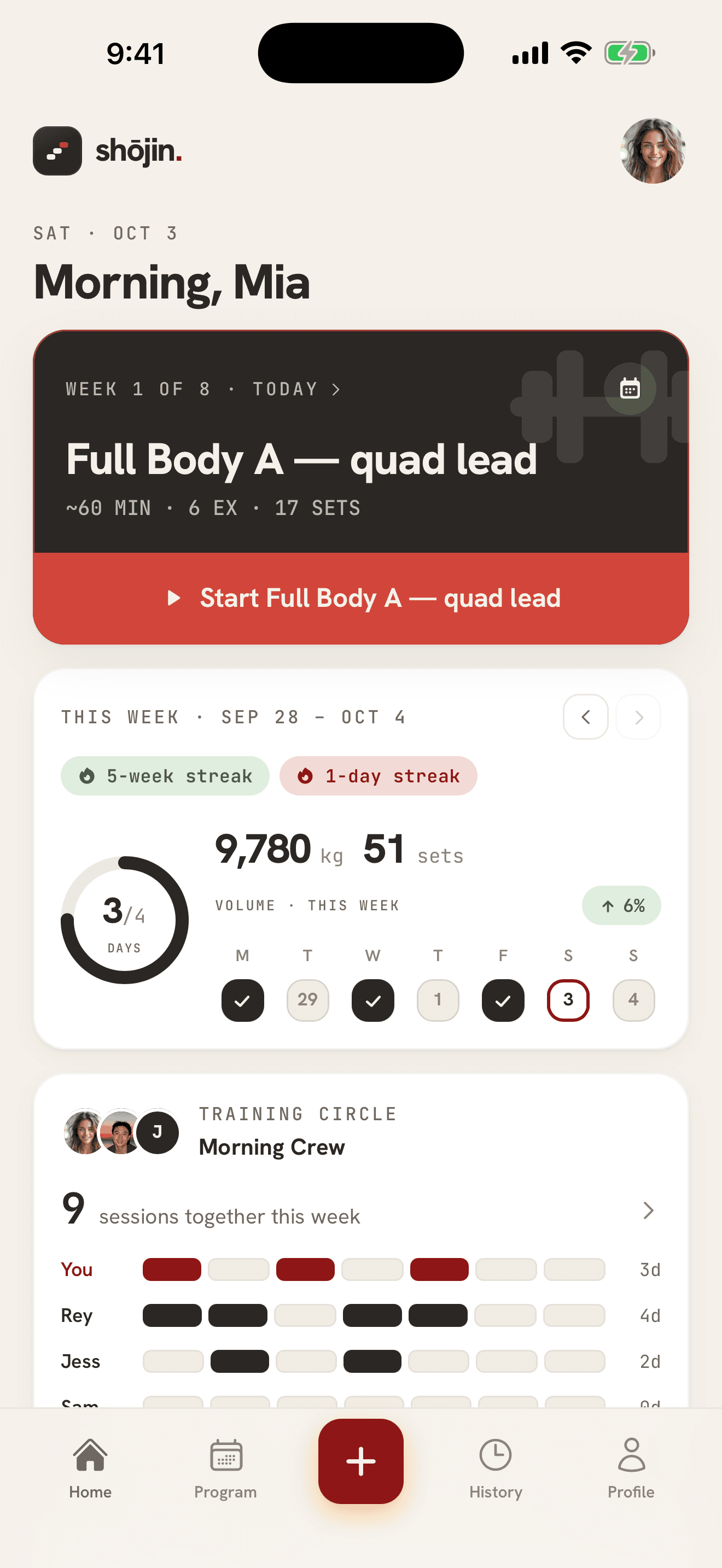
Shojin 1.2.4: today's workout on your Lock Screen. Built in the open by one person who trains five days a week. Changelog →
What it does
Built for the gym floor, not the feed
The one that matters
Log a set in seconds
Weight, reps, RPE, done. Warm-ups, drop sets, supersets, per-set notes, plate math, and a rest timer that follows you to the Lock Screen.
tap-to-apply ·82.5 kg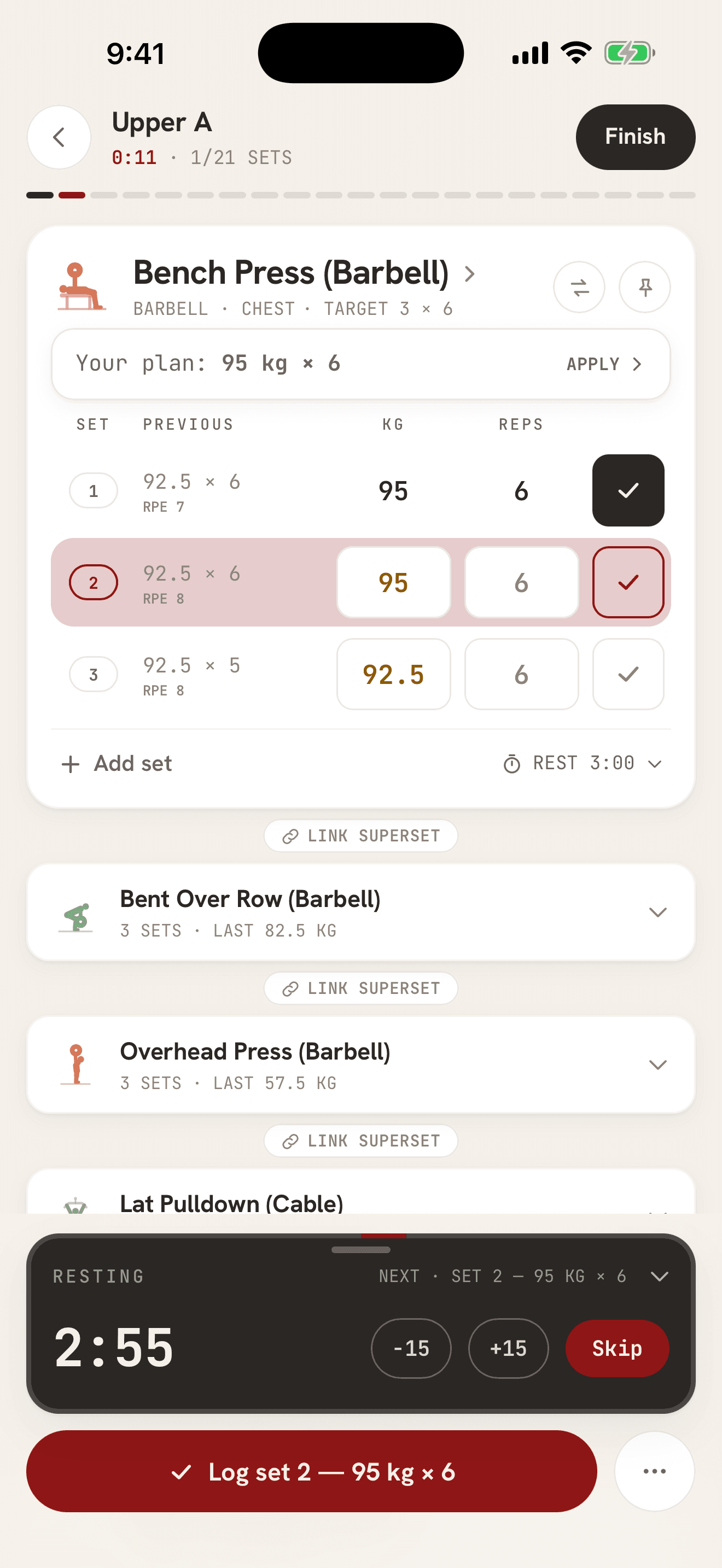
e1RM ↑ 4.2%
Progress you can trust
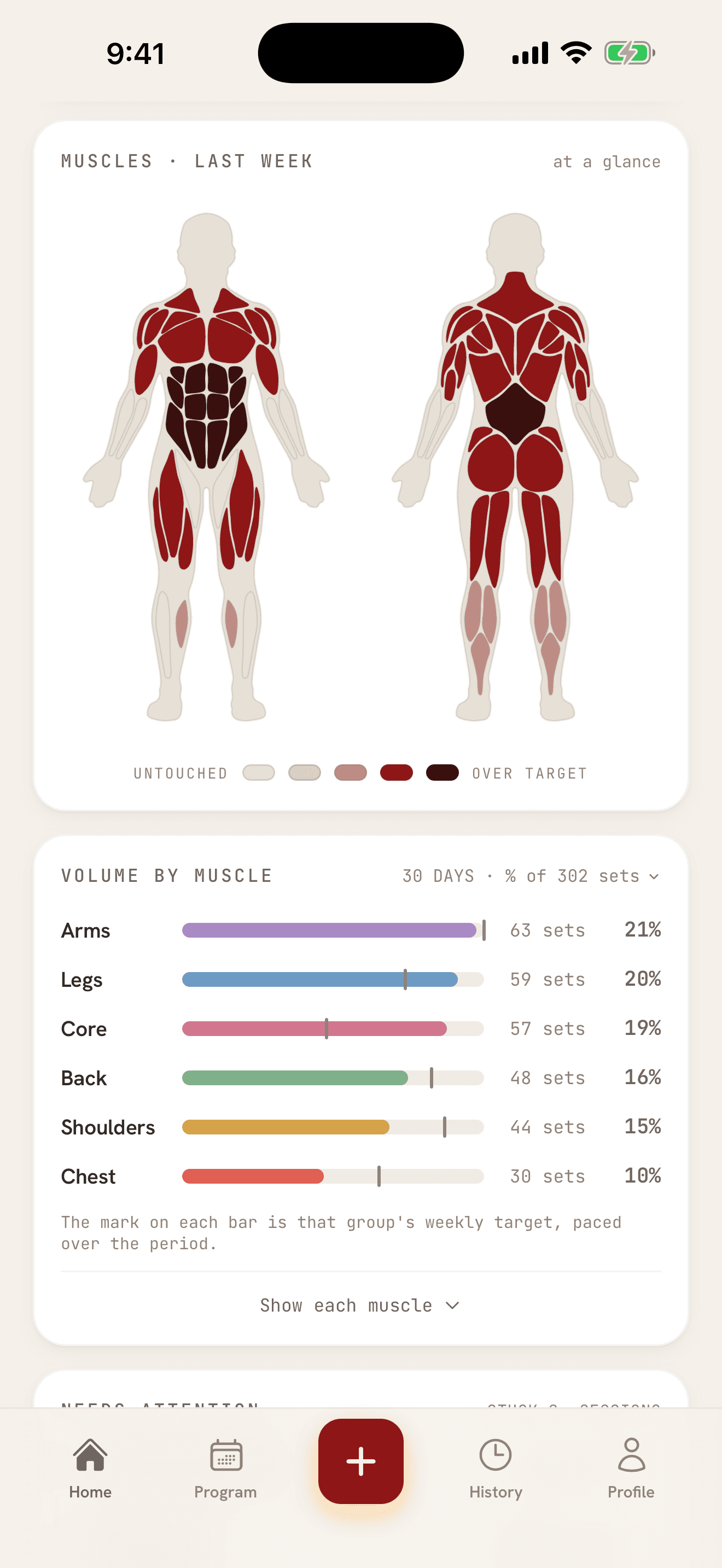
One-rep-max charts, records and weekly volume, computed from published formulas, not vibes.
Back · 12/16 sets
Weekly muscle targets
Evidence-based weekly set targets per muscle. A healthy “legs” number can’t hide starved hamstrings.
Shojin Coach
Stop guessing what to do at the gym.
We’ll write your program from your lifts and your schedule, with real loads, and adapt it to every session you log.
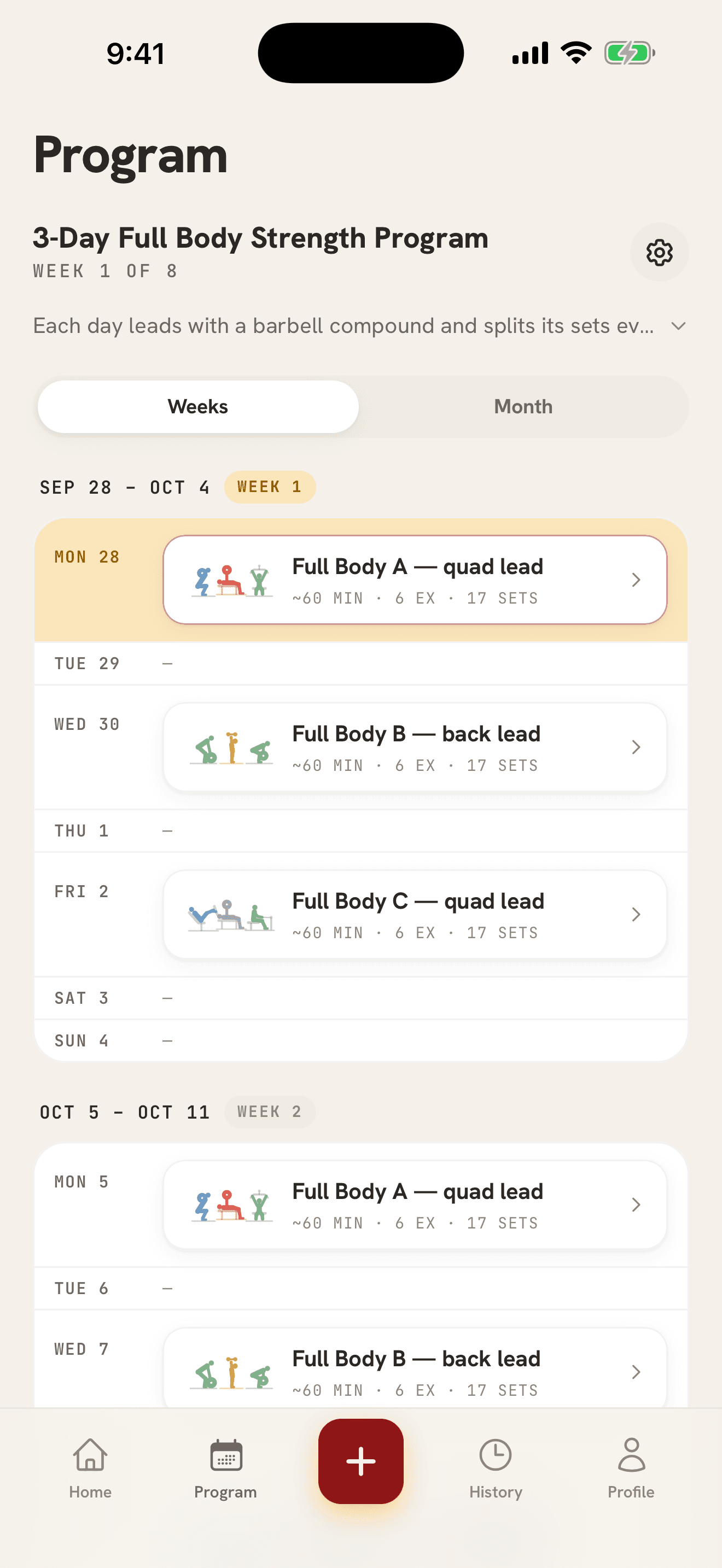
Built from your training
Answer a few questions: goal, days, session length, equipment, and anything to go easy on. Coach reads your history for the rest. A lift you have logged starts at a load taken from what you actually lift, and a new one starts with a guide until your first set.
Adjusts to every session you log
Your reps climb one at a time inside a range. When every set reaches the top, the weight goes up one step and the reps start again. A set that falls short, or comes in far harder than planned, moves that lift down a step. In the rest gap, Coach can offer a new load for the sets still to come.
Checks in after your first week
Coach asks how the program fits. Too hard or too easy shifts every session ahead by one step. Miss a stretch and you can refresh the rest of your program. Your finish date never moves.
AI reads your logged lifts and picks the exercises and sets for a science-based program. The loads, reps and effort follow rules from the published research and from experienced lifters, and the math is public.
14 days free, then A$69.99 a year or A$9.99 a month, billed by the App Store in your local currency. Subscribe in the iPhone app. Your program and your account are the same on the web.
How Coach writes a week →The science
The math is public
Every number Shojin shows you has a formula behind it, and none of them are secret. Strength charts use the blend of three published one-rep-max estimates: Epley, Brzycki, Lombardi. Weekly targets come from volume landmarks in the hypertrophy literature. And when you rate your top set, the suggestion under every exercise follows three plain rules:
- top set felt under RPE 10 → add one increment
- RPE 10 → hold the weight
- RPE 9–10 and fewer reps than last time → back off ~5%
Skip the rating and your reps decide: the weight holds while they climb. One bad day never flags a lift as stalled. It takes two stuck sessions in a row. Warm-ups and drop sets never drive the verdict.
Try it: last session’s top set
80 kg × 5barbell bench
How hard was it?
2 reps left in the tank
Next session
Go up · 82.5 kg
top-set RPE under 10 → add one barbell increment (+2.5 kg)
Guides
The evidence, in plain English
The questions lifters actually ask, answered from the published research, with every source listed.
All guides →- How long to rest between sets
- Do you need to train to failure?
- RPE vs RIR: how to rate a set
- Why a lift stalls, and what to change
- Why logging your workouts works, and what the evidence actually shows
- Runna for the gym: a plan that adapts to your lifts
- Double progression: how to add weight without guessing
- Workout tracker apps compared: Strong, Fitbod, JEFIT, Alpha Progression and Shojin
- Strong app alternative: free logging, with a science-based program on top
- How to track progressive overload, and what progress looks like
The app
Quiet design, loud numbers
Three screens carry the whole product. None of them ask for your attention twice.
01 · Logger
The logger keeps its mouth shut
Set rows, RPE, rest timer, plate math. No streak nags, no popups mid-set. The plan for your next set sits one tap away, not in your face.
02 · Home
Charts that don’t flatter you
A body map shaded by the work each muscle got, weekly sets against each muscle’s target, and the lifts that have stalled. If a lift stops moving, you’ll see it on Home.
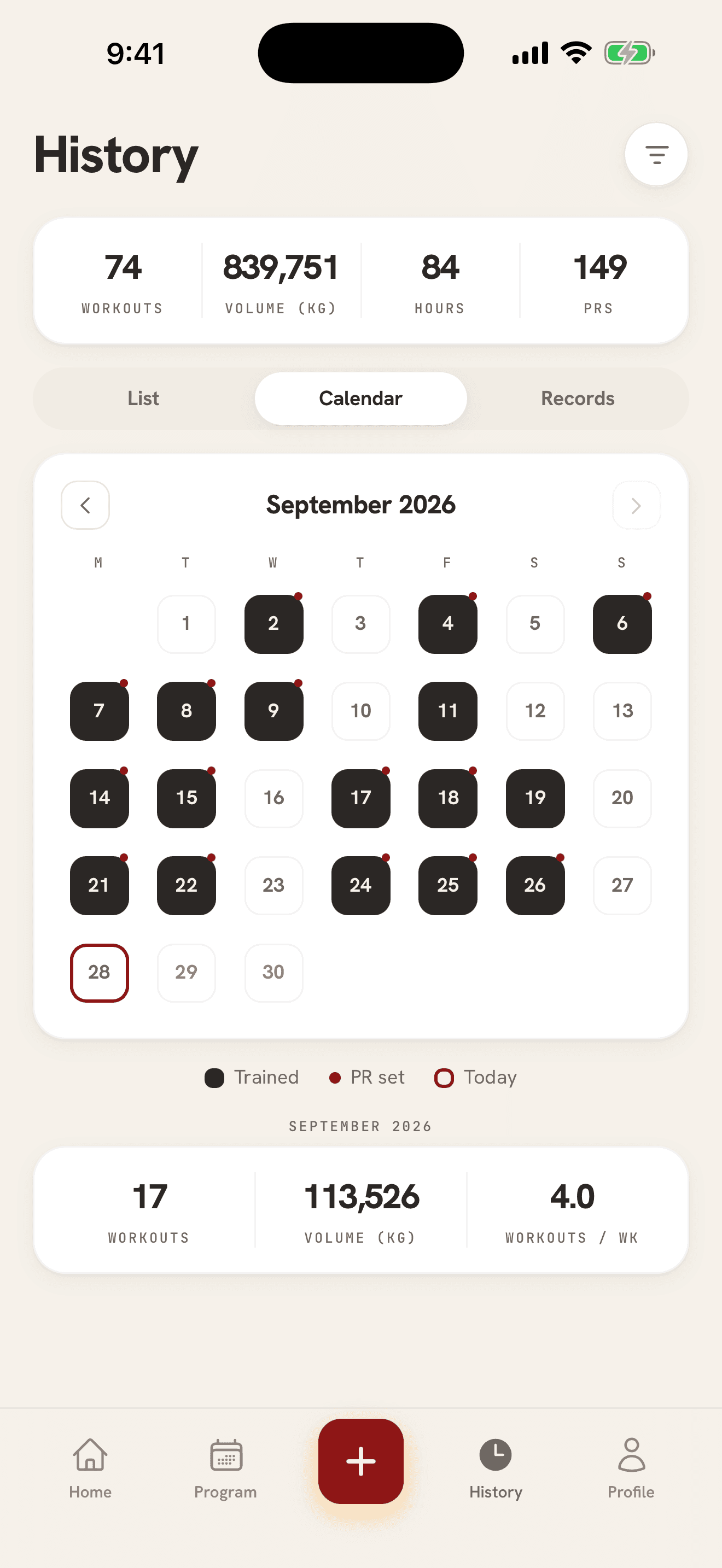
03 · History
Every session, one tab
A list, a calendar and your records. Notes and comments stay with the sets they belong to. Repeat any session, or edit one you logged three weeks ago.
Lock Screen and widgets
Your workout, without opening the app
Your rest, today’s session and your week, on the Lock Screen and the Home Screen of your iPhone.
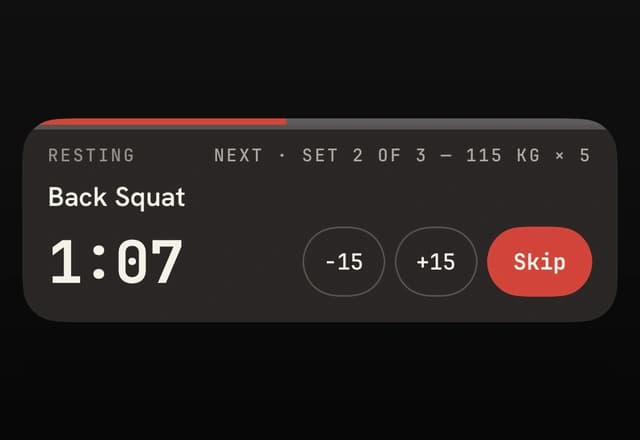
Rest timer on the Lock Screen
When you rest, the timer shows on the Lock Screen and in the Dynamic Island. Add 15 seconds or skip from there.
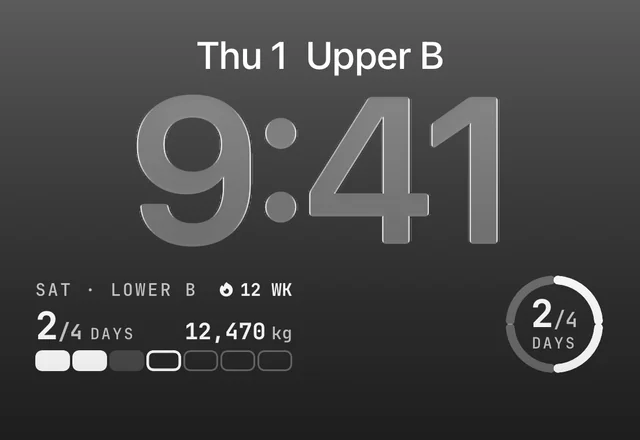
Today’s workout above the clock
The line above the clock names today’s workout. The widget below it shows your next session and your week so far.
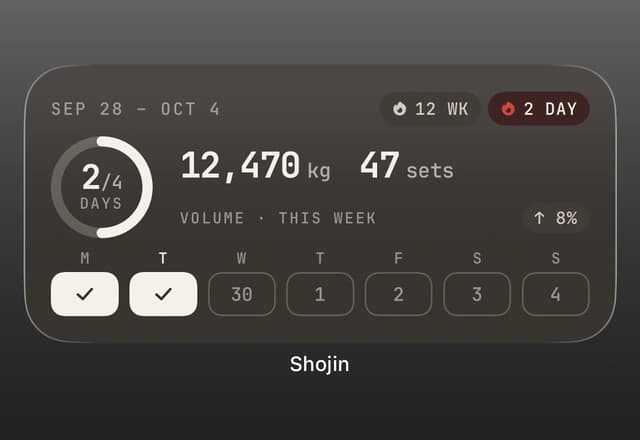
Your week on the Home Screen
Days trained, volume and sets for the week, and your streak, next to your other apps.
The rest of the kit
Everything else, quietly
Routines that save time
Build a routine once, supersets and all, and start it with a tap. Put your routines on a weekly schedule and you have your own program.
Train with your crew
An invite-only Training Circle: weekly activity boards, kudos, and a Sunday “Week Wrapped”. No feed, no strangers, no DMs.
Your data is yours
No ads, no ad trackers. Import from Strong or Hevy, export CSV or a full JSON backup, delete everything from inside the app.
FAQ
Fair questions
Is Shojin free?+
Shojin Coach is an auto-renewing subscription with a 14-day free trial, then A$69.99 a year or A$9.99 a month, billed by the App Store in your local currency. The workout logger is free. Everything else is free during early access.
What does Shojin Coach do?+
It writes a training block from your answers and your lifting history, and moves your reps and loads after each session you log. You choose how long the block runs, four, six, eight or twelve weeks, or leave that to Coach as well. It checks in after your first week, and you can refresh the weeks ahead when life gets in the way. Up to three programs in any 30 days, and one during the free trial. AI reads your logged lifts and picks the exercises and sets, and the program is science-based: the rules it follows come from the published research and from experienced lifters.
Can I write my own program?+
Yes. In the Program tab, put your saved routines on a weekly schedule and pick how many weeks it runs. Every session lands on your calendar, and Shojin can adjust your weights as you log. It is a Pro feature, free during early access.
Can I subscribe on the web?+
Not yet. Subscriptions are bought in the iPhone app through the App Store. Your account, your program and your history are the same on the web.
Is there an iPhone or Android app?+
Shojin is on the iPhone App Store, and new accounts start there. There is no Android app yet. Join the waitlist at shojin.fit/android. If you already have an account, you can also sign in on the web, with the same program and history.
Where does my data live?+
In your account, locked to your user at the database level. Nobody else can read it. Export a CSV of your sets or a full JSON backup anytime, and delete your account and every row of your data from inside the app.
Can I bring my history from Strong or Hevy?+
Yes. Export a CSV from either app and import it in Shojin. Your workouts come across and exercises are matched to Shojin’s catalog automatically.
What’s RPE and do I have to use it?+
Rating of perceived exertion, 0 to 10, which comes to how many reps you had left (RPE 8 is about two in the tank). It’s optional. A rated set tells Shojin when to add weight and when to back off. Skip it and your reps decide instead: the weight holds while your reps climb, and goes up once they stop. Shojin Coach reads it too, so a set far harder than planned moves that lift down a step.
Is the Training Circle public?+
No. Circles are optional and invite-only. A small group you chose sees each other’s weekly training activity. Nothing is public, and you can leave anytime.
Show up. Log the work.
Coming from Strong or Hevy? Bring your history with you. CSV in, nothing left behind. The next step is always a small one; that’s the point.
Free to start · No ads · No ad trackers